
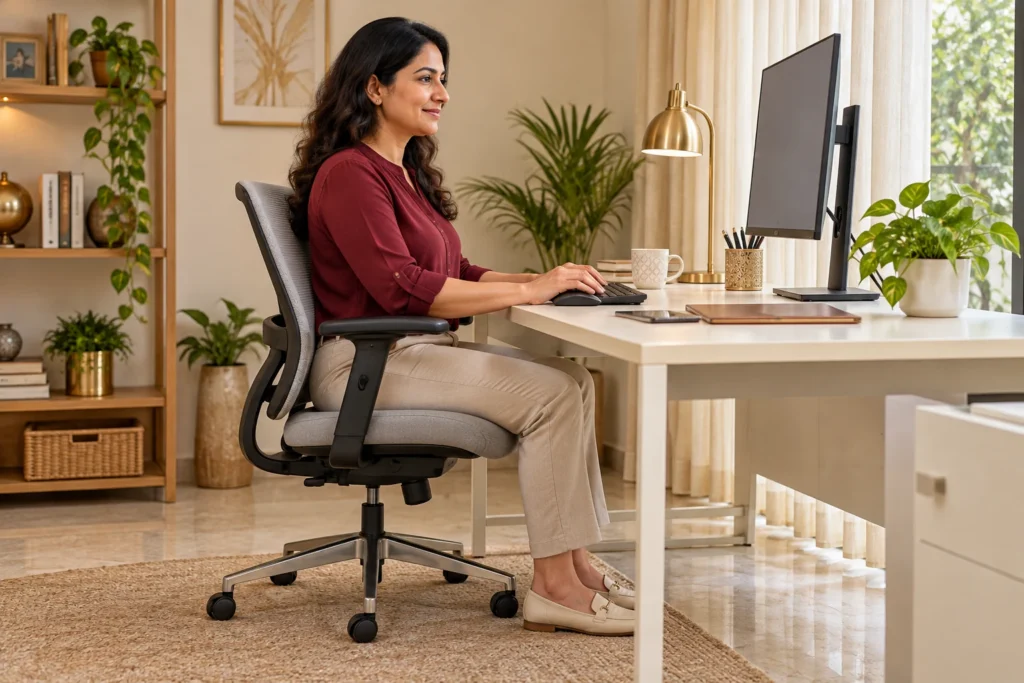
A comfortable sitting posture starts with support, an easy-to-reach workstation and regular movement. You do not need to hold your back perfectly straight all day. This guide explains how to make desk work more comfortable, especially when sitting brings on neck or lower-back discomfort.
Is there one correct sitting posture?
There is no single perfect posture that everyone must maintain. People vary in height, mobility, comfort and the tasks they perform. A relaxed, supported position is a useful starting point, but staying still in that position for hours is not the goal. Changing position matters too. An occasional slouch does not, by itself, prove that you have injured your spine. [1]
This distinction is useful if you spend the day checking whether you are sitting “correctly”. Instead, ask: can I read the screen without straining, use my hands without reaching and move easily when I need to? Treat posture as something adaptable, not a test you must pass.
How to set up a comfortable sitting posture at your desk
1. Give your feet and lower back support
Adjust your chair so your feet rest on the floor or a stable footrest. Sit far enough back to use the backrest. Its lower-back support should feel comfortable rather than push you into an exaggerated arch. Leave a little space behind your knees instead of pressing the seat edge into them. If the desk is high, raising the chair and adding a footrest may work better than leaving your feet hanging. [2]
Before buying a new chair, check the adjustments on the one you already have. Try one change at a time and notice whether the task feels easier. A small cushion can be an option to test for comfort, rather than something every person needs.
2. Bring the work towards you
Keep your keyboard and mouse close enough that your elbows can stay near your sides and your shoulders can relax. Aim for wrists that are comfortably aligned with your forearms. A keyboard positioned too far away can make you reach throughout the day; moving it closer is a simple adjustment. Armrests should support you without lifting your shoulders or stopping you from approaching the desk. [3]
3. Make the screen easy to see
Place the screen in front of you, with its top around or slightly below eye level as a starting point. Choose a viewing distance and text size that let you read without repeatedly leaning forward. Reduce glare from windows or lights. People using bifocal or progressive lenses may need a lower screen position to avoid tilting the head back. Comfort and clear vision should guide the final adjustment. [4]
Sitting posture when using a laptop or phone
A laptop joins the screen and keyboard together, so one position may not suit both viewing and typing. For longer desk sessions, try a laptop stand or stable riser with a separate keyboard and mouse. Raising the laptop while continuing to type on its keyboard can simply replace neck bending with arm reaching.
For phone tasks, bring the device to a comfortable viewing position and support your forearms when possible. Alternate tasks rather than keeping your head bent over a small screen for an entire session. These are practical ways to apply the same workstation principles; they are not a treatment for a diagnosed neck condition. [3] [4]

Build movement into the working day
Alternate computer work with tasks that let you change position. Stand for a phone call, walk to collect something or take a short break away from the screen when your schedule allows. OSHA advises short, frequent breaks during prolonged computer work and varying the tasks you perform. [5]
An example routine is to finish a work block, stand up, walk briefly and return with the chair and screen reset. A reminder can help, but it is not a medically prescribed timer. Adapt breaks to your symptoms, mobility and workplace. Standing motionless all afternoon is not the aim either: the useful change is variety.
What if your neck or back still hurts while sitting?
Start by noting what brings the discomfort on: a long session, a particular chair, looking down or reaching for a mouse. Record whether it settles when you change tasks and whether there is pain travelling into an arm or leg. This makes a consultation more informative than assuming the problem must be “bad posture”.
Arrange an assessment if back pain persists, keeps returning or interferes with your usual activities. Staying active within your tolerance is generally preferable to prolonged bed rest, but advice should be individualised when symptoms are significant. [6]
A consultation at Dr. Kataria Health in Kanpur
If sitting-related discomfort is disrupting work or sleep, bring a description of your symptoms and, if convenient, a photograph of your desk setup. Share any existing diagnosis and relevant reports. A consultation can help you discuss your concerns and suitable next steps; this article cannot diagnose the cause of pain.
Explore our patient information on neck pain, back pain and sciatica. These guides address different concerns; they are not a reason to self-diagnose from sitting discomfort.
Discuss discomfort that keeps returning
Dr. Kataria Health · Ratanlal Nagar, Kanpur
What to expect at your first consultation · Contact and directions
Sitting posture: common questions
Should I sit perfectly upright all day?
No. Use a comfortable supported position, and vary it. Holding yourself rigidly upright is not the same as being comfortable or active. [1]
Do I need an expensive ergonomic chair?
Start with fit and adjustability, not price. Foot support, a comfortable backrest and easy access to your work are useful checks. Try the available adjustments before deciding what equipment you need. [2]
Does sitting discomfort mean I have a disc bulge?
A symptom while sitting is not a diagnosis. Describe its location, duration and associated symptoms to a clinician rather than assuming a particular spinal condition.
Is a standing desk the solution?
It can offer another working position, but it does not replace movement or a comfortable setup. Use it to vary tasks rather than to swap hours of sitting for hours of static standing. [5]
Sources and further reading
- Cambridge University Hospitals: posture, core stability and lifting myths
- OSHA: workstation chairs
- OSHA: workstation keyboards
- OSHA: workstation monitors
- OSHA: work process and breaks
- NHS: back pain and warning symptoms
General patient education, not a diagnosis or personalised treatment plan. Generated images are illustrations, not photographs of clinic patients.